
AI directly in the ERP, with a realistic view.
Copilot and autonomous agents work directly in Business Central: Sales Order Agent, Payables Agent and more. We show what runs today, what is in preview and what it really takes.
Discuss your AI potentialAI goes all the way into the system.
AI does not stay on the sidelines. With Copilot and Business Central agents, artificial intelligence works directly in your ERP, takes on routine tasks, prepares data and sets up decisions. This way AI becomes part of daily operation, not just the project.
Business Central brings AI directly into the ERP: Copilot is included in every online licence, and autonomous agents take on entire workflows. The Sales Order Agent creates orders from customer emails, the Payables Agent processes incoming invoices through to approval, both are generally available. The Agent Designer for building your own agents is in preview. AI works on your data foundation, control stays with people.
Business Central Agents are AI agents that take over entire workflows inside Microsoft Dynamics 365 Business Central on their own, rather than only making individual suggestions. They work on the system's data and rules and expose every step, so a person can review and approve. Generally available today are the Sales Order Agent, which captures enquiries and orders from incoming email, and the Payables Agent for incoming invoices. Copilot is included in every online licence and helps with search, text and analysis. The Agent Designer, which lets you build your own agents without programming, is in preview. What decides the benefit is not the agent but the data foundation underneath: master data, processes and clear ownership have to be in place. Without them, an agent automates the wrong thing, only faster than before. The entry point is therefore worth taking where a workflow is already cleanly defined and recurs often.
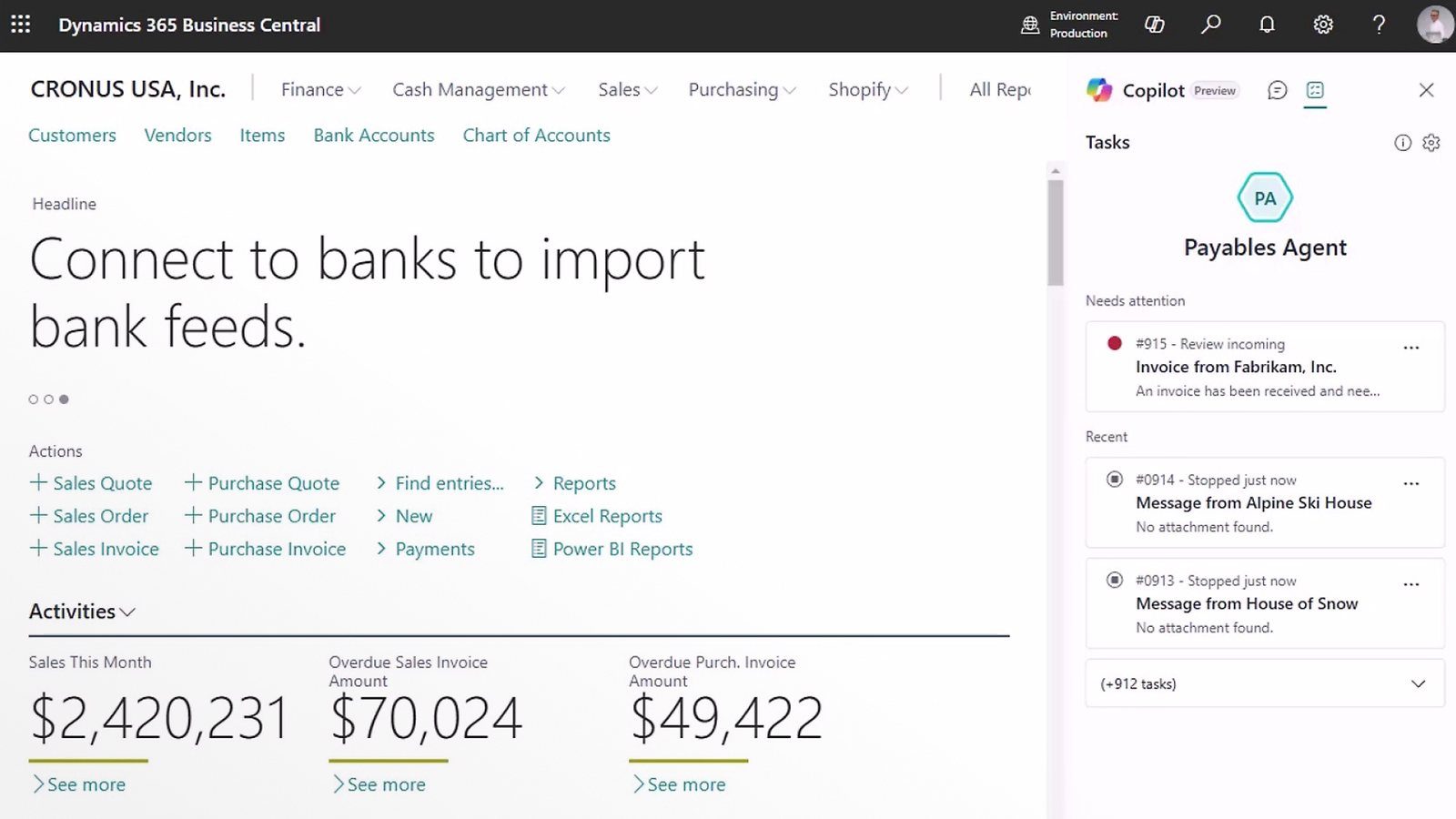
Copilot and agents, with a clear status.
As of Release Wave 2 (2025/2026), based on the Microsoft documentation. GA = generally available, Preview = preview.
AI has arrived in the ERP. But it amplifies good and bad data alike, so your data foundation decides whether it really helps.
Three things that count.
On your data foundation
AI works on your data, not in its place. It lifts efficiency where master data and processes are clean, and exposes weaknesses where they are missing.
People keep control
Agents suggest and prepare, confidence levels and approvals keep the decision with people. Automation needs traceable rules and checkpoints.
Cloud, with credits
Copilot is included in every Business Central online licence, consumption runs via Copilot Credits. Available only for Business Central online, not on-premises.
Why the data foundation is decisive here has now been quantified: Gartner expects organisations to abandon 60 percent of their AI projectsby 2026 if those projects are not built on AI-ready data. In practice an agent rarely fails on the model and almost always on what it reaches into.
Source: Gartner, „Lack of AI-Ready Data Puts AI Projects at Risk“, 26 February 2025
Maturity before function.
The right question is not which AI feature, but which process is mature enough to support it. Automation multiplies clean data. It multiplies dirty data just as fast. That is why the data foundation comes first.
Why the data foundation comes firstAgents in operation, not AI in delivery.
This page describes AI that works permanently in the ERP. How we use AI in project work itself, to implement faster and more precisely, is a separate topic.
What an AI agent in Business Central is, and what it is not.
AI agents in Business Central are functions that complete a task on their own inside the system instead of only making suggestions. They read your data, decide within defined rules and carry out steps, for example in order entry or payables processing. They present the result for approval.
Three terms get mixed up in the market. Copilot suggests, the human decides and approves. An agent executes on its own within its rules. Classic automation follows rigid rules without context and stops as soon as a case does not fit the pattern. An agent is therefore not a chatbot: it works inside the system, on your data and by your rules.
An agent needs three things, and none of them is technology: clean master data, because it does not distinguish between a maintained record and one that grew over the years; clearly defined processes, because it can only execute what has been decided; defined approval and escalation paths, so it is clear who steps in when a case falls outside the rule. If one of these is missing, the agent scales the error rather than the relief. That is why the order is data foundation, process, agent.
Which agents exist today, and where to start.
Business Central ships with several agents. The Sales Order Agent takes incoming orders, assigns items and conditions and prepares the order. The Payables Agent processes incoming invoices, matches them against purchase order and receipt and prepares the posting. Finance agents support reconciliation and recurring postings, an agent for customer communication handles order confirmations and status replies. The Expense Agent reads expense receipts and hands reports over for approval, available in Germany and Austria since summer 2026. With the Agent Designer you configure your own agents for your workflows, largely without code.
The right first agent is not the one that promises the most, but the one whose process is most clearly regulated and data-ready in your company. That is where the benefit is measurable and the risk is small. A usable selection procedure takes an hour: take the agents, rate each process for volume, clarity of rules and master data quality, and start where all three are good. If none remains, that is the real answer and shows where to work first.
Even the right agent will find data errors in operation that nobody had seen before. What matters then is who works through its findings. Different rules apply to Dynamics NAV and Business Central on-premises: Is there AI for Business Central on-premises and NAV?
What a partner does when agents take over the execution.
As long as the value of a partner lay in customising, it was about development hours: the more special paths were built, the higher the revenue. That set a quiet incentive to build complexity rather than reduce it. With agents this reverses. They take over the recurring execution, and the value lies in processes being rule-based, data being clean and agents being sensibly limited.
That is exactly where a senior partner becomes more important, not redundant. Someone has to decide which task an agent may take over, which rule applies and where the human must remain. That is steering, not programming, and it takes experience with the consequences of such decisions over years.
Three questions for a partner: does he strengthen you in governance and data foundation, or does he depend on development hours that an agent will make redundant anyway? Does he reduce complexity so that processes become rule-based, or does he keep it alive? Does he talk about responsibility and the limits of the agents, or only about features? The third question is the most telling, because features are documented and the limits only come from experience. The agent takes the execution off your hands, not the responsibility.
Related content.
What is asked about AI in Business Central.
What does Copilot cost in Business Central?
Copilot is included in every Business Central online licence, with no additional licence. The consumption of certain AI features runs on Copilot credits, which can incur additional costs depending on usage. For planning this means: the entry barrier is zero, the running costs follow actual usage and stay visible and controllable through the admin center.
Does AI also run in Business Central on-premises?
No. Copilot and the agents are only available for Business Central online, not for on-premises installations. If you want the AI capabilities you need the cloud, and for many companies that is the tangible reason to plan the move now rather than later.
Are the agents reliable enough for live operation?
The available agents work with confidence levels and approvals: the agent proposes, a person approves, and only as the hit rate grows does more get automated. Whether that holds up in daily operations depends less on the agent than on the data foundation it works on. Clean master data and clear rules are the prerequisite, not the finishing touch.
Agents are one building block, not the whole picture. You will find the wider frame on the overview Business Central as your home.
Which of your processes is ready for AI?
In conversation we find out where AI already works in day-to-day operation. Senior-led, without hype.
Arrange a conversation